

PLC Programming: 8 Best Practices for Maintainable Code
Write clean, maintainable PLC code in Siemens TIA Portal: proven naming conventions, FB/FC structure, NAMUR alarm handling, Git and simulation testing.

1.Introduction
PLC programming is more than just stringing logic blocks together. In over 10 years as an automation engineer, I've seen countless PLC projects – many with typical problems:
- Unreadable variable names like
M0.0,DB1.DBX0.0, or%MW100 - Inconsistent programming language mix – LAD, FBD, STL, and SCL wildly mixed in the same project
- Missing documentation – the original programmer left the company long ago
In this article, I share the most important best practices for maintainable PLC programs with Siemens TIA Portal.
Target Audience
This article is aimed at PLC programmers with basic knowledge of TIA Portal. For beginners, I recommend first taking an IEC 61131-3 fundamentals course.
2.Why Best Practices in PLC Programming?
2.1.The Problem: Legacy Code
Typical scenario from my practice:
A machine builder calls: "Our plant is down. Can you help?"
On-site disillusionment:
- Variable names like
M0.0,DB1.DBX0.0,%MW100– nobody knows what they mean - LAD, FBD, STL, and SCL wildly mixed in the same project
- No comments, no structure
- Original programmer left the company years ago
Troubleshooting takes unnecessarily long because nobody can navigate the code.
2.2.The Solution: Professional Programming
Structured, maintainable PLC programs bring clear advantages:
- Faster troubleshooting through descriptive variable names
- Shorter onboarding time for new programmers
- Fewer machine downtimes through better error handling
When the existing program looks exactly like this
The eight practices below can be applied from day one in a new project – in a program that has grown over years they have to be retrofitted, and that rarely happens alongside day-to-day work. Structure, naming conventions and a versioned block library are something I take on as a defined work package, together with a code review of the existing project if needed: PLC programming with TIA Portal.
3.Best Practice 1: Consistently Use IEC 61131-3 Standards
IEC 61131-3 is the international standard for PLC programming and mandatory for CE-certified machines.
3.1.The 5 Programming Languages Overview
| Standard (IEC) | Siemens | Use case | Limits |
|---|---|---|---|
| LD – Ladder Diagram | KOP | Interlocks, simple logic | Unwieldy beyond ~50 networks |
| FBD – Function Block Diagram | FUP | Control, data flow logic | Hard to maintain in large programs |
| IL – Instruction List | AWL | Legacy code only | Deprecated since 2013 |
| ST – Structured Text | SCL | Algorithms, calculations, libraries | Less illustrative for pure interlocks |
| SFC – Sequential Function Chart | GRAPH | Sequential control (GRAFCET) | Overhead for simple logic |
Common misconception: SCL and ST are the same language — SCL is Siemens' implementation of Structured Text. Listing both separately counts one language twice and usually drops IL in exchange.
My Recommendation
Use SCL/ST for 80% of code (logic, calculations, sequential control) and LAD only for simple interlocks (e.g., E-STOP logic). FBD for control loops, SFC for complex state machines.
In depth: Which language suits which task, how the standard's names map onto the Siemens names, and why SCL and ST are the same language — see the dedicated article The 5 PLC Programming Languages of IEC 61131-3.
3.2.Structured Programming: The Pyramid

OB1 (Main)
  └── FC_SystemControl (Operating modes)
       ├── FB_PackMLStateMachine (Sequential control)
       │    ├── FB_MotorControl (Component)
       │    ├── FB_ValveControl (Component)
       │    └── FB_ConveyorControl (Component)
       └── FC_AlarmHandler (Utility)
Rule: Each level has exactly ONE clear responsibility.
4.Best Practice 2: Establish Naming Conventions
4.1.The Problem: Variable Name Chaos
Negative example (from practice):
// ❌ BAD
M0.0    // What is this?
DB1.DBX0.0   // Which motor?
%MW100  // Temperature? Pressure?
Positive example:
// ✅ GOOD
bMotorPumpMainRun : BOOL;  // Main pump motor running
iTemperatureTank1 : INT;   // Tank 1 temperature in °C
rPressureSetpoint : REAL;  // Pressure setpoint in bar
4.2.Standardized Prefixes (Hungarian Notation)
| Prefix | Data Type | Example |
|---|---|---|
b | BOOL | bMotorRun, bAlarmActive |
i | INT | iCounter, iTemperature |
r | REAL | rSpeed, rPressure |
s | STRING | sAlarmText, sRecipeName |
dt | DATE_TIME | dtStartTime, dtLastMaintenance |
t | TIME | tDelayStart, tCycleTime |
udi | UDINT | udiPartCounter, udiTotalProduction |
4.3.Inputs/Outputs with Prefix
// Inputs: ix (Input X)
ixMotorFeedbackRun : BOOL AT %I0.0;  // "x" = Bool
iwTemperatureSensor : WORD AT %IW0;   // "w" = Word

// Outputs: qx (Output X)
qxMotorStart : BOOL AT %Q0.0;
qwValvePosition : WORD AT %QW0;
Consistency is king: Decide on ONE convention with your team and document it.
Tooling
Siemens TIA Portal v18+ offers Code Quality Check that automatically checks naming conventions.
In depth: Why a prefix table alone is not yet a standard — and what interface contracts, a versioned library and a defined exception path have to do with it — see the dedicated article PLC Coding Standards: From Naming Conventions to a Reusable Library.
5.Best Practice 3: Use Function Blocks vs. Functions Correctly
5.1.Function Blocks (FB) - Stateful
When to use?
- Components with state (motor, valve, conveyor)
- Alarm handlers
- State machines
Example: Motor Control
FUNCTION_BLOCK FB_MotorControl
VAR_INPUT
  bStart : BOOL;        // Start command
  bStop : BOOL;         // Stop command
  bFeedback : BOOL;     // Motor running feedback
END_VAR

VAR_OUTPUT
  qxStart : BOOL;       // Motor start output
  bRunning : BOOL;      // Status: Motor running
  bAlarm : BOOL;        // Fault active
END_VAR

VAR
  tDelayStart : TON;    // Start delay
  tTimeoutFeedback : TON; // Feedback timeout
  bAlarmLatched : BOOL; // Latched fault
END_VAR

// Program logic here...
END_FUNCTION_BLOCK
Call:
// In OB1 or FC
dbMotorPumpMain(
  bStart := bSystemRun AND NOT bEmergencyStop,
  bStop := bSystemStop OR bEmergencyStop,
  bFeedback := ixMotorPumpMainFeedback
);
qxMotorPumpMainStart := dbMotorPumpMain.qxStart;
5.2.Functions (FC) - Stateless
When to use?
- Calculations without state
- Scaling
- Mathematical operations
- Utility functions
Example: Temperature Scaling
FUNCTION FC_ScaleTemperature : REAL
VAR_INPUT
  iwRawValue : INT;  // Raw sensor value (0-27648)
  rMinTemp : REAL;   // Minimum temperature (e.g., -50°C)
  rMaxTemp : REAL;   // Maximum temperature (e.g., +150°C)
END_VAR

// Scaling 0-27648 → rMinTemp to rMaxTemp
FC_ScaleTemperature := rMinTemp +
  (REAL#iwRawValue / 27648.0) * (rMaxTemp - rMinTemp);
END_FUNCTION
Call:
rTemperatureTank1 := FC_ScaleTemperature(
  iwRawValue := iwTempSensor1,
  rMinTemp := -50.0,
  rMaxTemp := 150.0
);
Rule of Thumb
Does it have state (memory between calls)? → FB Is it a calculation or utility function? → FC
6.Best Practice 4: Error Handling According to NAMUR NE 107
NAMUR NE 107 is the industry standard for self-monitoring and diagnostics in process automation. In mechanical engineering, it has also become established.
6.1.The 4 States

6.2.Implementation with FB_AlarmHandler
FUNCTION_BLOCK FB_AlarmHandler
VAR_INPUT
  bTrigger : BOOL;          // Alarm trigger
  eAlarmLevel : INT;        // 1=Info, 2=Warning, 3=Error, 4=Critical
  sAlarmText : STRING[80];  // Alarm text
END_VAR

VAR_OUTPUT
  bAlarmActive : BOOL;      // Alarm is active
  bAckRequired : BOOL;      // Acknowledgment required
END_VAR

VAR
  bAlarmLatched : BOOL;     // Latched alarm
  dtTimestamp : DATE_TIME;  // Alarm timestamp
END_VAR

// Logic: Latch alarm, set timestamp, acknowledge if needed
IF bTrigger AND NOT bAlarmLatched THEN
  bAlarmLatched := TRUE;
  dtTimestamp := CURRENT_TIMESTAMP();
  bAlarmActive := TRUE;

  // Logging to HMI/SCADA
  // ...
END_IF;

bAckRequired := bAlarmLatched AND eAlarmLevel >= 3;
END_FUNCTION_BLOCK
Best Practice: A central alarm manager collects all alarms and communicates them bundled to the HMI.
Important
Each alarm needs a unique ID (e.g., ALM-001) and a description in documentation. This is mandatory for FDA-regulated systems.
7.Best Practice 5: Version Control with Git
Yes, Git works for PLC code too! Since TIA Portal v18, integration has become significantly easier.
7.1.Setup: TIA Portal with Git
1. Activate Multiuser Engineering
TIA Portal → Project → Properties → Multiuser Engineering → Activate
2. Save project in Git-friendly format
# .gitignore for TIA Portal
*.ap18
*.zap18
__OPNB*
*.bak
3. Initialize Git repository
git init
git add .
git commit -m "Initial commit: TIA Portal project setup"
7.2.Branching Strategy for PLC Projects
main (Production code)
  ├── develop (Development)
  │    ├── feature/motor-control-update
  │    ├── feature/add-safety-logic
  │    └── bugfix/alarm-text-typo
  └── hotfix/critical-emergency-stop-bug
Workflow:
- Create feature branch:
git checkout -b feature/new-conveyor-logic - Commit changes:
git commit -m "Add conveyor start delay 2s" - Create pull request (GitHub, GitLab)
- Code review by second programmer
- Merge into
develop - Testing on development PLC
- Release branch →
main
Advantages
- Team collaboration without data loss
- Historical versions retrievable anytime
- Parallel work on different features
- Automatic backups (GitHub, GitLab Cloud)
8.Best Practice 6: Comments and Documentation
8.1.Code Comments: The 3-Line Rule
Bad:
// ❌ Obvious, adds nothing
bMotorRun := TRUE;  // Start motor
Good:
// ✅ Explains WHY, not WHAT
// 2s delay due to pressure build-up in hydraulic circuit
// (See requirement REQ-HYD-012)
tDelayStart(IN := bStartRequest, PT := T#2S);
qxMotorStart := tDelayStart.Q;
8.2.Documentation Standards
For each FB/FC:
(*
  Name: FB_MotorControl
  Version: 1.2.0
  Author: David Prybisch
  Date: 2025-11-22

  Description:
    Standardized motor control with start delay,
    feedback monitoring and fault latching.

  Change History:
    v1.2.0 - 2025-11-22 - Added timeout monitoring
    v1.1.0 - 2025-10-15 - NAMUR alarm integration
    v1.0.0 - 2025-09-01 - Initial version
*)
FUNCTION_BLOCK FB_MotorControl
// ...
END_FUNCTION_BLOCK
UML Diagrams for System Architecture:
Use tools like PlantUML or Microsoft Visio to visualize overall architecture.
In depth: What belongs in a complete plant documentation, the 12 points that matter at handover, and how to reconstruct lost as-built documentation — see the dedicated article PLC Documentation: What Belongs In It and What Matters at Handover.
9.Best Practice 7: Testing and Simulation
9.1.Simulation with PLCSIM
Siemens PLCSIM Advanced allows testing PLC programs without physical hardware:
Workflow:
- Develop PLC program in TIA Portal
- Start PLCSIM Advanced and load project
- Set and check variables via watch table
- Systematically test sequential controls
Advantages:
- Detect errors early – in the office instead of at the customer's site
- New programmers can test safely
- Validate changes before commissioning
Tip
Use watch tables in TIA Portal to systematically force inputs and outputs and check program behavior.
10.Best Practice 8: Performance Optimization
10.1.Keep CPU Utilization in Check
Common performance killers:
- Too many timers/counters → Use arrays instead of individual variables
- String operations in real-time cycles → Move to lower-priority tasks
- Complex calculations in OB1 → Use cyclic interrupts (OB35)
Example: Array-based Timer Management
// ❌ BAD: 100 individual timers
VAR
  tMotor1 : TON;
  tMotor2 : TON;
  // ... 98 more timers
END_VAR

// ✅ GOOD: Array of timers
VAR
  atMotorTimers : ARRAY[1..100] OF TON;
END_VAR

// Call in loop
FOR i := 1 TO 100 DO
  atMotorTimers[i](IN := abMotorStart[i], PT := T#2S);
  aqxMotorStart[i] := atMotorTimers[i].Q;
END_FOR;
10.2.Memory Optimization with Multi-Instances
Problem: Each FB instance consumes its own DB (instance DB).
Solution: Multi-instances for recurring blocks.
// FB_ConveyorLine contains 10x FB_MotorControl as multi-instance
FUNCTION_BLOCK FB_ConveyorLine
VAR
  Motor1 : FB_MotorControl;  // Multi-instance
  Motor2 : FB_MotorControl;
  // ...
END_VAR

// Create only ONE instance of FB_ConveyorLine
dbConveyorLine : FB_ConveyorLine;  // Saves 90% memory vs. 10 separate FBs
11.What Clean Code Saves During Troubleshooting
Every best practice above pays off at the latest when a plant is down and the fault has to be found under pressure. Programmers who work in a structured way don't search for faults – they narrow them down: symptom → affected block → signal path → root cause. When each plant section is encapsulated in its own FB with a meaningful name, you know immediately where to look instead of digging through thousands of networks in OB1.
That is the practical return on the FC/FB separation, the naming conventions and the clear hierarchy from the previous chapters: they turn hours of guesswork into a targeted search of minutes.
In depth: The full method – the five steps from the alarm view to the block, the right TIA Portal tools, why forcing is almost never the answer, and the five fault classes behind most problems – is covered in the dedicated article PLC Troubleshooting: Find the Root Cause in 5 Steps.
12.Conclusion: Professional PLC Programming Pays Off
The investment in structured, maintainable PLC programs pays off multiple times:
- Faster troubleshooting through descriptive variable names and clear structure
- Shorter onboarding time for new programmers
- Fewer machine downtimes through better error handling
- Easier maintenance over the entire system lifetime
12.1.Checklist for Your Next PLC Project
- Naming conventions agreed and documented with team
- Hierarchical program structure planned (UML diagram)
- IEC 61131-3 standards followed
- Alarm management according to NAMUR NE 107 implemented
- Git repository set up and
.gitignoreconfigured - Simulation with PLCSIM prepared
- Code review process established
- Documentation (FB header, system architecture) created
Next Step
Start small: Take an existing project and refactor ONE FB according to these best practices. The time investment (2-4 hours) pays off at the next troubleshooting session.
13.Infographic: PLC Best Practices at a Glance

14.Further Resources
- IEC 61131-3 Standard: PLCopen.org
- Siemens TIA Portal Best Practices: Siemens Support
- NAMUR NE 107: NAMUR.net
- Git for PLC: PlcGit Documentation
About the Author: David Prybisch has been working as a PLC programmer for over 10 years. He supports machine builders with structured programming using Siemens TIA Portal, code reviews, and commissioning – in Luxembourg, Saarland and the Trier region, as well as for clients in Switzerland.
Questions about your automation project?
As an automation engineer based in Stadtbredimus, Luxembourg, I offer free initial consultations for companies in the Greater Region Saar-Lor-Lux.
David Prybisch · PLC · HMI · Commissioning
Related Articles

React HMI Development with WinCC Unified: A Practical Guide
Building HMIs with React or JavaScript skills? WinCC Unified runs JS on the V8 engine. Concrete synergies, API comparisons and real code examples.
Read more: React HMI Development with WinCC Unified: A Practical Guide
Automation in Luxembourg 2025: Trends Shaping the Greater Region
PLC programming & industrial automation in Luxembourg: 6 trends for 2025, real projects at Goodyear, Husky & more + funding programs for SMEs.
Read more: Automation in Luxembourg 2025: Trends Shaping the Greater Region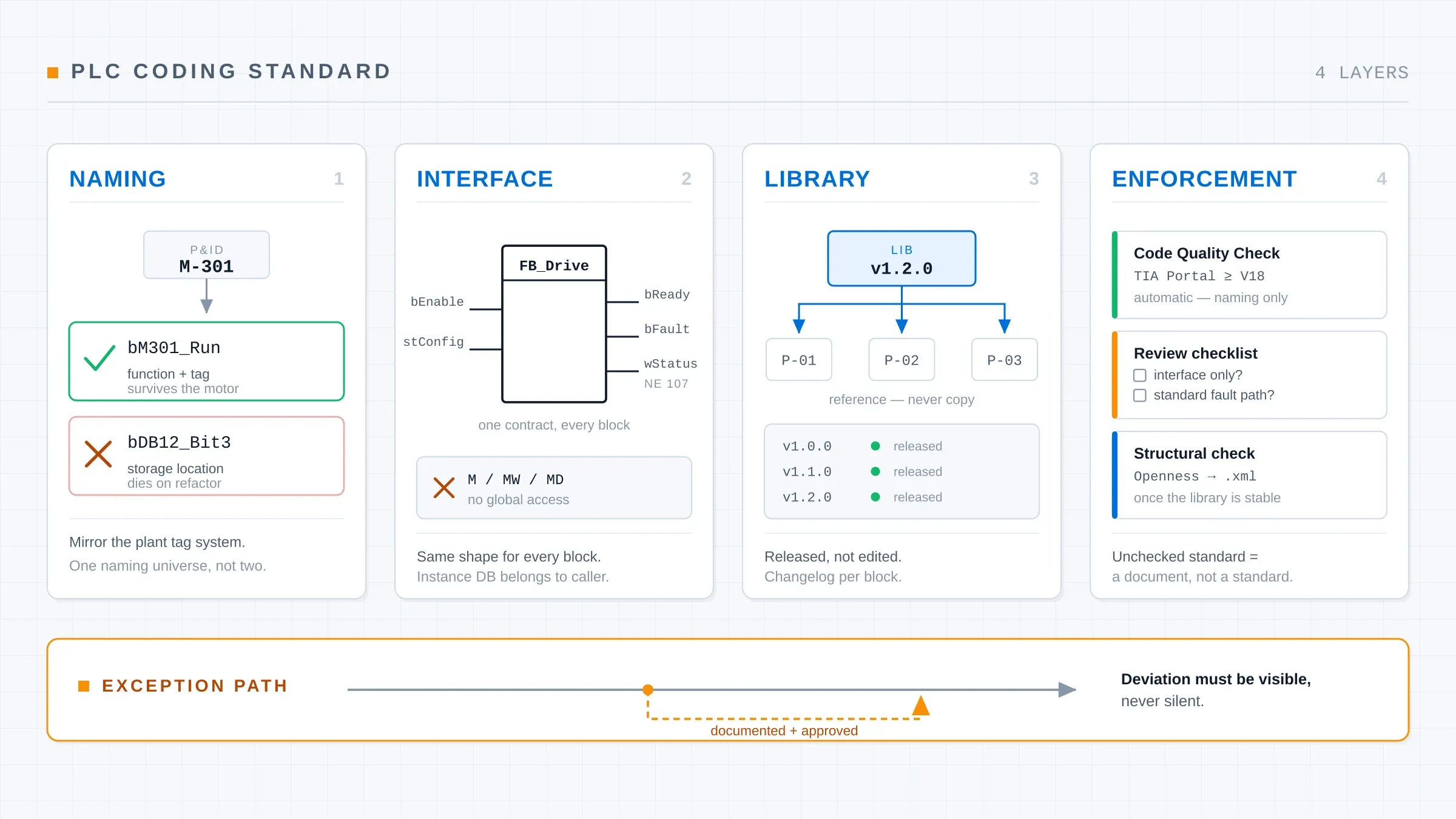
PLC Coding Standards: From Naming to a Reusable Library
A PLC coding standard that survives contact with a real project: naming that scales, block interface contracts, a versioned library and workable enforcement.
Read more: PLC Coding Standards: From Naming to a Reusable Library