

S7-300 Retrofit: Migrating to S7-1500 and WinCC Unified
S7-300 discontinued, S5 long out of spare parts: how a control system retrofit to S7-1500/S7-1200 and WinCC Unified works — often without a new cabinet.
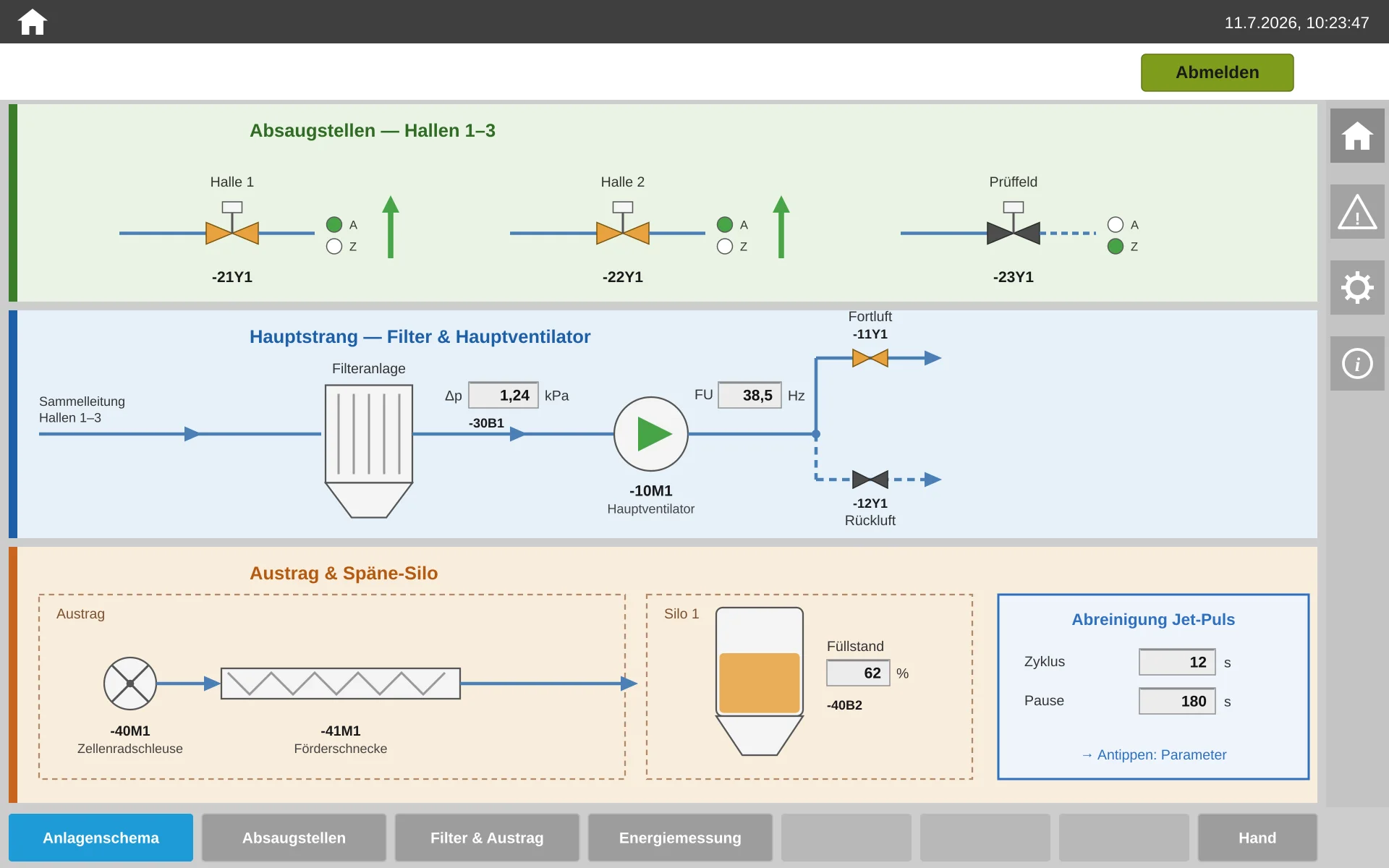
The SIMATIC S7-300 has been discontinued since October 2025, and the S5 lost its official spare-parts supply long ago — while many plants still run on operator panels that haven't been available to buy for years. This article shows how a control system retrofit works today: from the S5, S7-300 or S7-400 to the S7-1500 or S7-1200, with a new WinCC Unified visualization — often without building a new control cabinet, with a downtime window of days instead of weeks, and with circuit diagrams that match reality again afterwards.
Who is this relevant for? For two groups. Operators and maintenance managers of plants with legacy S5 or S7 controls — from recycling operations through food production to machine building — who want to know what lies ahead before they award a contract. And panel and control system builders without their own software department who want to offer retrofits to their customers and are looking for a programming partner to take on the PLC, visualization and documentation in full.
1.Why now? Three deadlines that set the schedule
A retrofit is rarely urgent — until it suddenly is. Three dates currently set the frame:
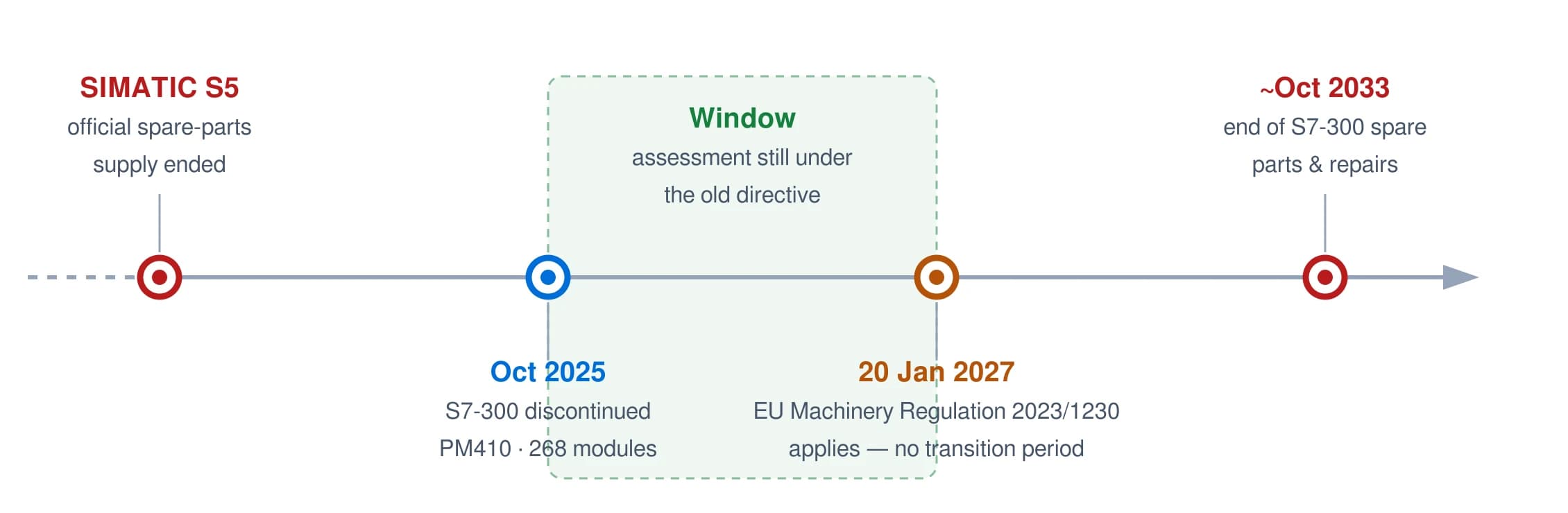
1. The S7-300 has been discontinued — and the S5 is long past that point. In October 2025 (Product Announcement PM410), Siemens withdrew 268 modules of the S7-300 and ET 200M family from new business. Spare parts and repairs are set to remain available until roughly October 2033 — but prices are already climbing, and the available quantities shrink every quarter. For the S5, this point was passed long ago: the official spare-parts supply has run out, and procurement now happens only through the second-hand market — at prices that grow more absurd every year, and without any warranty. Anyone still running an S5 in production today is operating their plant on borrowed time.
2. The new EU Machinery Regulation applies from 20 January 2027 — without a transition period. Regulation (EU) 2023/1230 replaces the Machinery Directive 2006/42/EC. In Article 18, it defines for the first time in binding terms when a change to an existing machine counts as a "substantial modification" — with a new CE assessment as the consequence. Anyone who completes and documents their retrofit in 2026 still assesses it under the familiar rules of the old directive. That is not a trick, but the planned use of a window of opportunity.
3. The equipment around the controller is getting smarter. Modern sorting technology, camera systems and energy monitoring speak PROFINET and OPC UA. An S7-300 from 2008 — let alone an S5 — cannot connect to these systems, or only with makeshift workarounds. A retrofit is therefore more than spare-parts insurance: it is the precondition for the plant to remain expandable at all over the next ten years.
For the cost side and regional funding programs, it is worth a look at the article PLC Retrofit Costs: What Control System Modernization Really Costs — this article here focuses on the process: what happens during a professional retrofit, step by step?
2.The most common misconception: "retrofit = new control cabinet"
Many operators put the subject off because the word retrofit brings a complete rebuild to mind: a new cabinet, new wiring, weeks of downtime, a six-figure budget. In many cases, none of that is necessary.
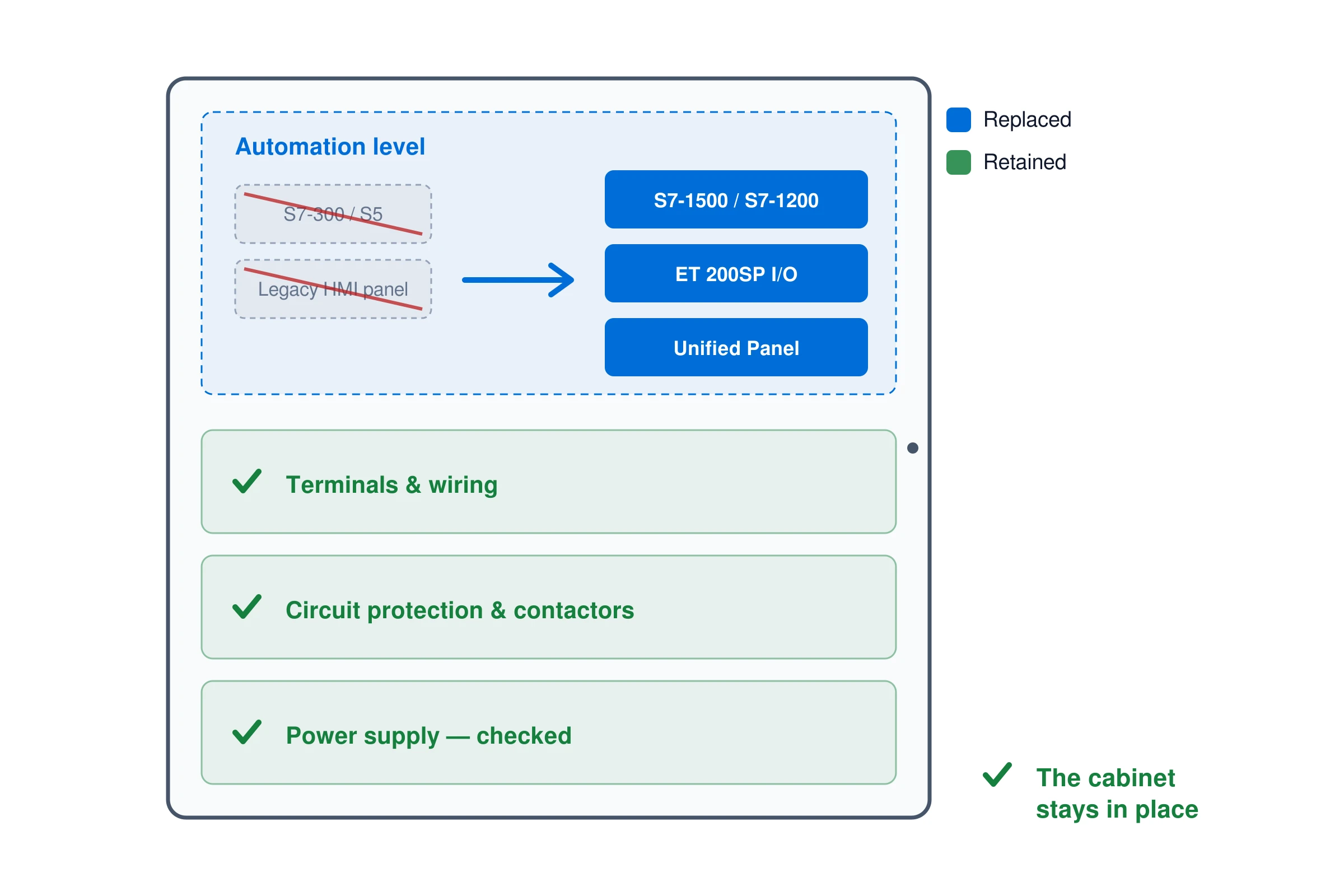
A control cabinet from 2010 is often in perfectly good mechanical and electrical shape: terminals, circuit protection, contactors and wiring still have many years ahead of them. Only the automation layer is old — the CPU, I/O modules, operator panel. That is exactly when a component retrofit is the most economical route: the old controller is removed, the new one installed, the old operator panel replaced with a Unified Panel — and the cabinet stays where it is.
2.1.From practice: extraction system, S7-300 out, S7-1200 in — cabinet stays
A real example from an industrial company in the Greater Region (2026): an extraction system was running on an S7-300 with an operator panel from the WinCC flexible era — the spare-parts situation increasingly critical, the panel discontinued long ago. The conversion:
- S7-300 removed, S7-1200 installed — together with matching I/O modules, in the existing cabinet, on the existing wiring.
- Old panel replaced with a Unified Basic Panel — with a completely rebuilt visualization instead of converted legacy screens.
- Program restructured, symbols created entirely from scratch, every function run through in a system test before commissioning.
- The circuit diagrams were delivered as part of the package: the pages for the old controller were removed from the drawing set and replaced with newly created pages for the new hardware. The operator received a drawing set that shows the real end state, not the one from 2010 plus a pile of handwritten notes.
No cabinet construction, no new electrical installation, no general-contractor overhead — what was old got replaced, what was good stayed. That is exactly why the project was considerably cheaper for the operator than any full-rebuild quote: the conversion of the automation components, the software, the visualization and the drawing updates all came from a single source.
When is a component retrofit not enough? When the cabinet itself is at the end of its life (corrosion, lack of space, thermal problems) or the plant is being fundamentally expanded. The site survey reveals that — and then the right partner is a control cabinet manufacturer I work with in such cases: the cabinet construction comes from them, the software, visualization and commissioning from me.
3.Why a straight 1:1 migration falls short
The seemingly simplest route: lift the program into TIA Portal with the migration wizard, port the HMI screens over, done. It works technically — and in most cases it is the worst of the available decisions. Three reasons:
- The legacy baggage moves with it. An S7 program that has been changed by rotating hands for 15 years contains dead blocks, duplicate flags, hard-coded values and structures that nobody can explain anymore. A 1:1 migration preserves exactly this state — just on new hardware. The next fault search takes just as long as before.
- The new capabilities go unused. The S7-1500 and S7-1200 offer structured data types, symbolic addressing, integrated diagnostics and clean library concepts. Anyone who only migrates pays for modern hardware and keeps programming like it's 2005.
- A migrated HMI stays an old HMI. Converted screens carry over the screen layout, operating logic and alarm structure of the old system — often without adapting to today's display formats and without the capabilities of WinCC Unified (web access, scalable vector graphics, modern operating concepts). The result looks new and operates like the old one.
The alternative is not a complete rebuild of the plant, but a structured rebuild of the program and visualization on the basis of the existing, proven plant logic — the behavior of the plant stays, the substance underneath is renewed. How this works without months of project runtime is shown by the following six steps.
4.The process: six steps from legacy system to modern control
4.1.Step 1 — Site survey: the program doesn't lie
Every serious retrofit begins with the most uncomfortable truth: the existing documentation is almost never correct. Wiring diagrams from 2009, changed by hand fourteen times, revision states unclear — that is the norm, not the exception.
That is why I work with two sources against each other:
- The PLC program is the source of truth. What runs in the controller is the reality of the plant — not what the diagram says. I first read out the old program in full and analyze its structure: which inputs and outputs are really wired up and used? Which interlocks actually exist? An input that is polled in the program but appears in no diagram is a typical discovery — and exactly the kind of surprise you want to find before commissioning, not during it.
- The circuit diagrams are checked against it and systematically captured — every terminal, every address, every device retrofitted later on. AI-assisted tools speed up this legwork considerably: a folder of scanned legacy drawings becomes a structured, searchable overview of all devices, addresses and connections in hours instead of days. Every result is checked by hand — but the searching is done by the machine.
This works even in tough cases. An example from practice: an old program of which only an online upload with no symbols at all still existed — no source project, no comments, no documentation. From that upload and the scanned wiring diagrams I reconstructed the symbols and the structure, traced the grown plant logic and carried it over into the new control world — instead of reinventing everything on suspicion and risking the plant's established sequences. After more than ten years as a PLC programmer and commissioning engineer, you read such programs the way other people read old handwriting: laborious, but reliable.
Why this comes first: without a solid site survey, every cost estimate is guesswork. With it, the quote becomes calculable — for both sides.
4.2.Step 2 — Hardware mapping: what becomes of each module?
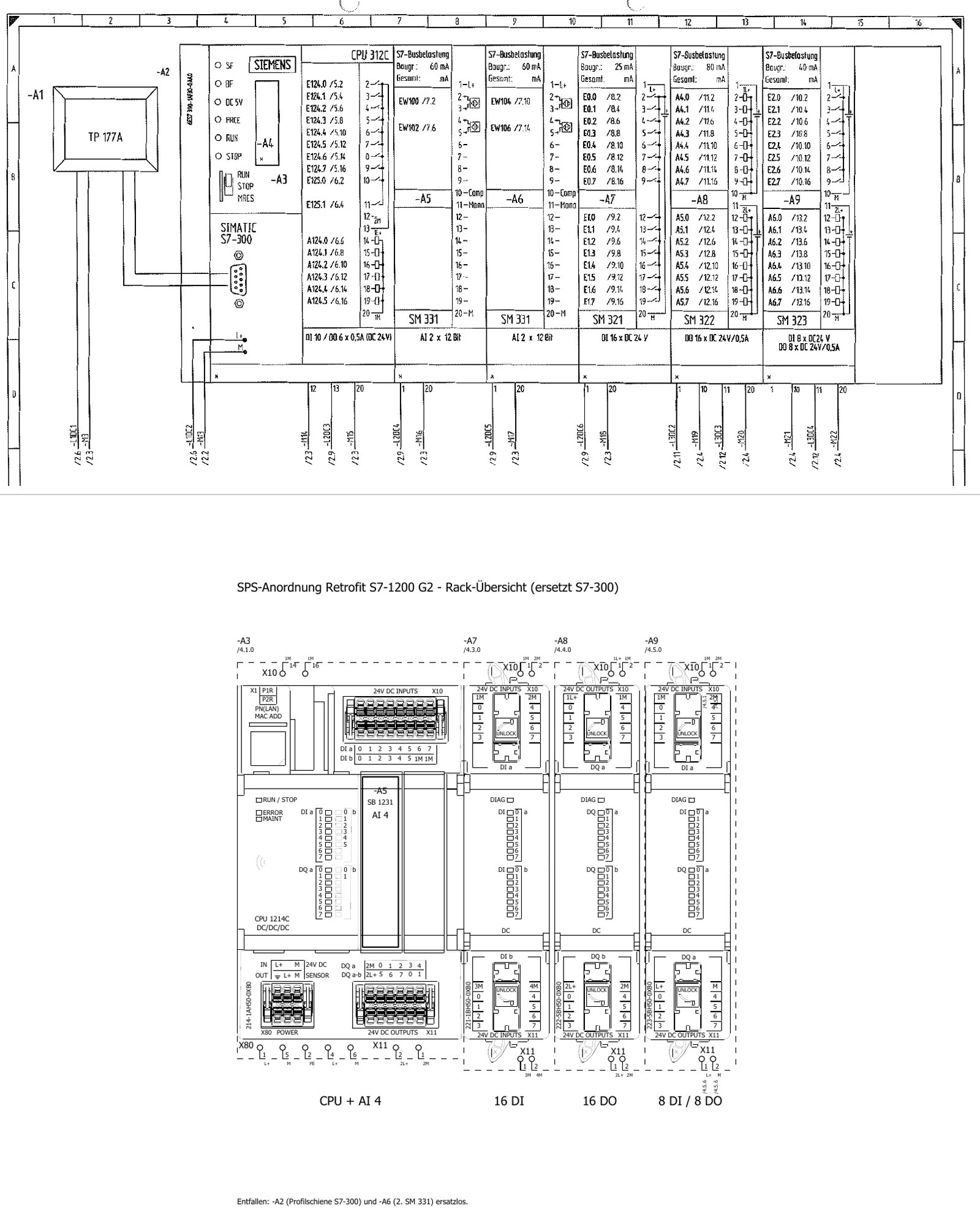
The site survey produces the hardware mapping: every module of the old system is assigned its successor — CPU, digital and analog peripherals, communication modules. Typical decisions in this step:
| Existing | Successor | What to watch for |
|---|---|---|
| S5 / S7-300 / S7-400 CPU | S7-1500 or S7-1200 (depending on program size and peripherals) | Quantity structure, communication load, safety requirements |
| ET 200M (distributed) | ET 200SP | Address offset and channel assignment — a small difference, a big effect at startup |
| Conventional wiring in the cabinet | Usually stays in place | Terminals, circuit protection and power supply are checked, not swapped wholesale |
| Operator panel (OP/TP/MP, Comfort) | Unified Panel or PC runtime | The screen concept is rebuilt, not converted (Step 4); often the matching Unified Panel is even cheaper than the Comfort successor |
A component retrofit — replacing the automation components, keeping the wiring and cabinet — typically costs 30 to 60 percent of a new system and pays for itself in 12 to 36 months. This step is also where the CE question falls: if safety functions are affected (for example a frequency converter swap with STO activation), that has to be clarified before the order is placed, not after.
And the circuit diagrams? They are part of the deliverables. The pages for the old control system are removed from the drawing set and replaced with newly created pages for the new hardware, with page cross-references between old and new. In the end the operator receives a consistent drawing set as a PDF that shows the real end state; more extensive outputs such as terminal diagrams are agreed depending on the scope of the plant. How these pages come about internally is my toolkit — what counts is this: the new control layer is fully documented, the diagrams match reality, and they come with the plant.
4.3.Step 3 — Program rebuild: symbols and blocks to a standard
Now the new program takes shape — not as a conversion, but as a structured rebuild on the basis of the documented plant logic:
- The symbols are created from scratch, directly from the reconciled as-built documentation. Every input and output carries a meaningful name and the comment from the diagram — the days of
I 12.3with no explanation are over. - The basic functions (motors, valves, interlocks, fault messages) come from a proven, standardized block library — uniformly built, uniformly diagnosable, operated the same way on every project.
- The plant logic (step sequences, operating modes, recipes) is traced from the old program, cleaned up and rebuilt in a modern structure — including the unwritten changes of the last 15 years that exist only in the old code. The plant's established logic is preserved; what's new is the structure underneath.
- Every block is tested before commissioning — first in a dry run against defined scenarios, then in the full system test (Step 5).
The result is a program that reads as documented, behaves like the plant — and that the next maintenance technician understands without archaeology. Which standards make the difference is shown in the article PLC Programming: Best Practices for Clean, Maintainable Code.
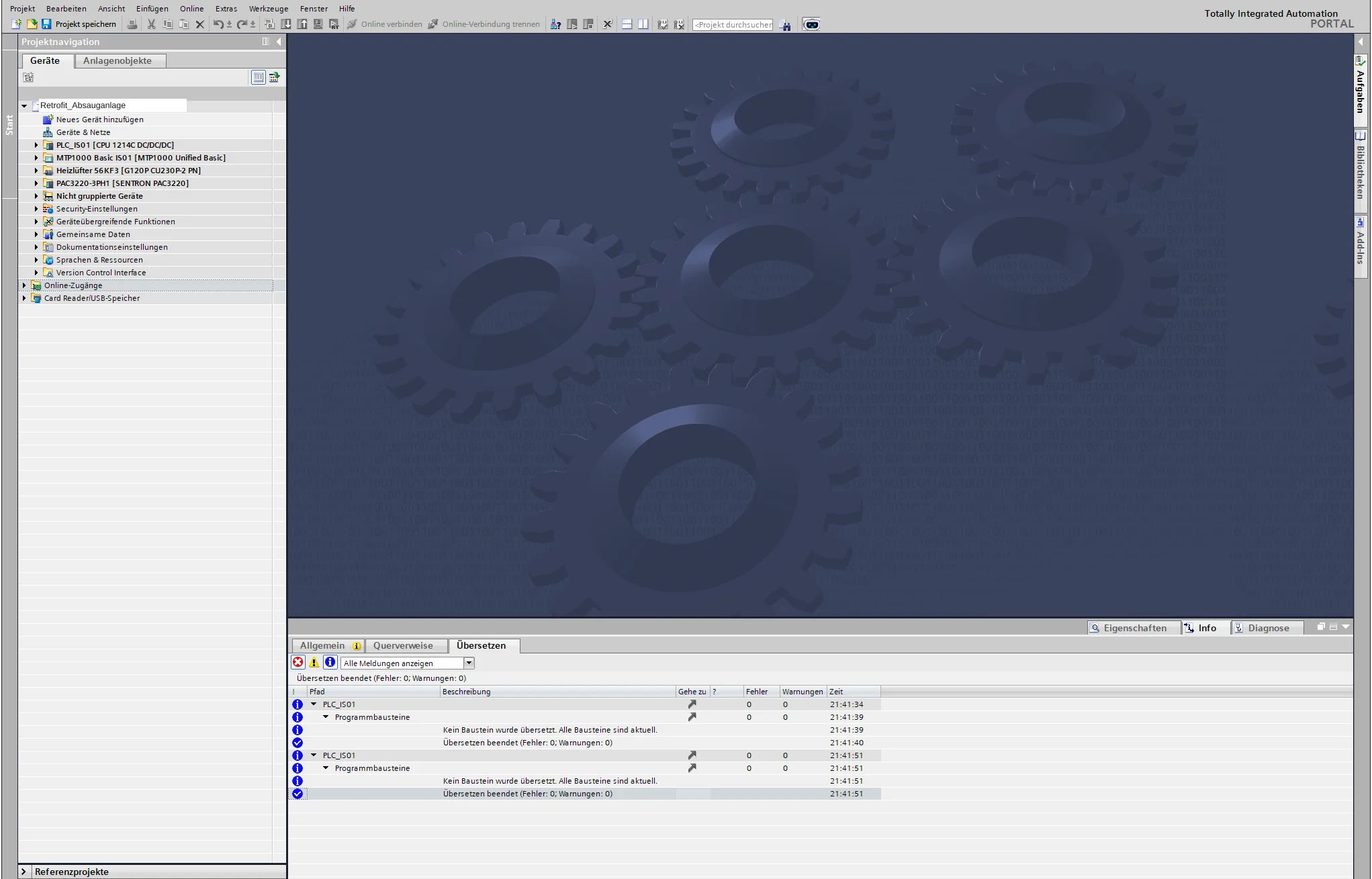
4.4.Step 4 — HMI: WinCC Unified with a new screen concept instead of migrated legacy screens
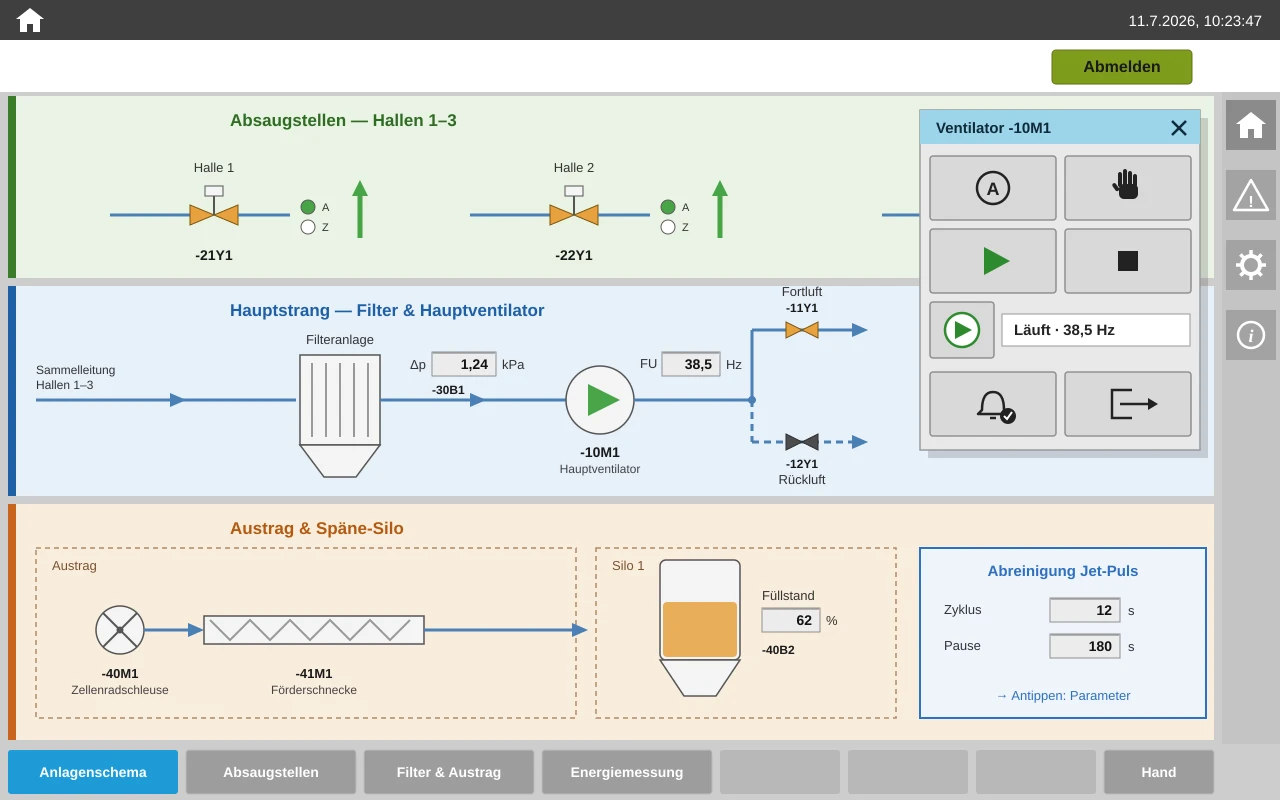
The visualization is the part the operator sees every day — and the part where a rebuild pays off most clearly. Instead of converting old screens, the visualization is built in WinCC Unified to a consistent screen concept:
- Plant overview as a navigable schematic: the operator sees the plant as a flow diagram with states at a glance — not a collection of number fields. A click on a unit opens its control window.
- Individual control pop-ups per device type: a motor, valve, damper or controller is operated in context — operating mode, setpoints, faults in one place. Every device symbol is tailored to its device type as scalable vector graphics (SVG) and shows state and fault directly in the plant view; the associated pop-up is cut to exactly that device rather than a one-size-fits-all window for everything.
- A consistent alarm concept: messages with plain text, priority and acknowledgment logic instead of cryptic group faults.
- Web access included: WinCC Unified is browser-based — the plant state can be viewed from the control room, the office or a tablet on the shop floor, without additional software. Why web technology is a gain in the HMI environment is explored in more depth in the article Web Technology in Automation.
Because this screen concept is based on a reusable in-house standard, "rebuilt" does not mean "drawn from scratch": the structure, operating logic, symbol and pop-up library are in place — what is project-specific is the plant schematic, the units and the texts. This is how even a mid-sized existing plant gets a visualization at a level otherwise seen only in large new-build projects — for an effort that used to be budgeted for merely porting screens over.
4.5.Step 5 — End-to-end testing before the plant goes down: a test setup instead of a surprise
The most expensive place for a program bug is a plant standing still. That is why testing happens before the cabinet is opened — and the whole system, not just individual blocks:
- Dry run of the blocks: every basic function and every step sequence is checked against defined scenarios — normal operation, fault cases, limit values.
- End-to-end test on the real target hardware: the new CPU is procured for the project anyway — so it is also used for testing before it goes into the cabinet. The complete PLC program runs in a test setup on the real S7-1500 or S7-1200, with the Unified visualization running against it in its runtime — exactly the combination that will later work on the plant, not just a virtual simulation. Then everything is run through: every button, every message, every sensor. Each input is stimulated individually and the reaction of the sequence logic is checked — step sequences run through, interlocks provoked, fault scenarios triggered, the operating concept tried out against the reproduced process.
- Dress rehearsal for the changeover day: the sequence of the conversion (swap hardware, download, signal test, trial run) is planned through in advance, with clear fallback points.
The effect: on site the work is wiring, checking and starting up — no longer programming. The downtime window shrinks to days, and it is known in advance, not afterwards.
4.6.Step 6 — Commissioning and handover: everything from a single source, the documentation matches again
After startup the project is not over — it is only complete when the handover is right:
- Revised circuit diagrams that show the real end state: old controller pages removed, new pages added (the basis for this was created in Steps 1–2),
- complete symbol tables and block documentation from the TIA project,
- HMI operating documentation for the new screen concept,
- training for operators and maintenance,
- and — for failsafe programs — the safety records from the software side: documented safety functions, achieved performance level, F-parameters and test records. They are input documents for your conformity assessment; the CE assessment itself is the responsibility of the operator or the machine manufacturer, not of the software supplier.
With that, the plant has documentation you can trust again for the first time in years — and the foundation for every future expansion.
5.Why this is affordable: no departments, no overhead — the legwork is done by AI
A fair objection: "A rebuild instead of a migration, a new visualization, end-to-end testing, updated diagrams — that sounds like the most expensive offer on the market." It is usually the opposite. Two reasons:
First, the structure. At a traditional plant or control system builder, a project like this passes through several departments — planning, hardware, software, visualization, documentation — with handovers, coordination loops and the overhead that such an apparatus inevitably costs. Here there is exactly one person responsible who knows the plant himself, from the old program to the operating screen. Short paths are not a marketing slogan, they are the cost factor.
Second, the tools. The legwork that used to consume whole department-hours — capturing legacy drawings, building symbol tables, updating documentation, coding out repetitive structures — is today handled by AI-assisted engineering tools in a fraction of the time. What remains is the work that requires experience: understanding plant logic, making decisions, testing, commissioning. That is exactly what the customer pays for — not for legwork.
Important, because it's often misunderstood
No AI runs in the controller itself. The PLC works with deterministic, tested logic — exactly as safety and standards demand. No model makes CE decisions, no algorithm writes safety functions unchecked. AI speeds up the engineering; the checking, the decisions and the responsibility lie with people. This separation is not a marketing caveat, but the condition under which AI can be used responsibly in a machine environment at all.
The result of this combination: quality that used to be affordable only in large projects — at the price of a lean retrofit.
6.The underrated bonus: OPC UA — the interface that makes your plant AI-ready
One aspect of the retrofit is overlooked in almost every quote, even though it can deliver the greatest added value over the years: with the new controller, the plant gains a standardized data interface to the outside world — OPC UA. The S7-1500 ships with the OPC UA server as standard, as does the new S7-1200 G2 (from firmware V4.0); an S5 or S7-300 simply does not have this door. OPC UA is no exotic choice here, but the international industry standard (IEC 62541), with encryption and role-based access rights — you can define exactly who is allowed to read which data.
Why this is interesting in connection with AI: AI does not belong in the PLC — but alongside it. Via OPC UA, external analysis systems can tap the plant data for reading, while the controller itself runs its deterministic logic untouched. What is already realistically feasible with this today, without corporate IT and without additional sensors:
- Alarm and fault analyses: which sensor reports most often? Which fault recurs every week? Instead of tally sheets and gut feeling, evaluating the message data yields a solid ranking — the best basis for targeted maintenance.
- Downtime reports: "The plant was down 47 minutes this week — 31 of them due to a fault at damper 3." Such analyses are generated automatically from the operating states the controller already knows.
- Plain-text reports instead of raw data: readable shift or weekly reports can be generated automatically from the structured process data — the plant manager reads a summary, not columns of numbers.
- Energy monitoring: log consumption and load peaks per plant section and detect deviations — often the first indication of wear or operator error.
- Early warning from existing data: motor currents, run times and cycle times that the PLC records anyway serve as a wear indicator — a gradual change is noticed by the analysis long before a human spots it in day-to-day operation.
Realistic expectations
Soberly put: the benefit lies in visibility and faster diagnosis, not in a "self-healing plant" — promises like that should be believed from no one. And none of it has to be live on changeover day. But it is the difference between a plant that merely runs and a plant that tells you how it runs. The retrofit unlocks this door — you can use it whenever you are ready.
7.What this means for operators, in the end
| Commonly the case before | With this approach |
|---|---|
| Quote based on estimated legacy inventory, add-on charges follow | Costing based on a complete site survey — a fixed price becomes possible |
| "Retrofit" means: new control cabinet, new installation | Component retrofit where the existing system allows it — what's old gets replaced |
| Weeks of downtime, programming on site | A downtime window of days — end-to-end tested before the cabinet is opened |
| 1:1 migration: new hardware, old structure | Rebuild to a standard: maintainable, diagnosable, expandable |
| HMI "looks the same as before, just on a new panel" | WinCC Unified with plant schematic, individual device pop-ups and web access |
| Documentation stays at its pre-conversion state | Handover with revised circuit diagrams, symbols, safety records |
| Plant data stuck inside the controller | OPC UA opens the plant to monitoring, reports and AI analysis — read-only, secure, standardized |
And the time factor? A structured retrofit of this kind is achievable today in a fraction of the project runtime that was still common just a few years ago. For the operator, what counts is less the engineer's calendar time than three tangible consequences: a shorter, plannable downtime window, a solid price instead of open add-on charges — and quality that simply would not have been affordable before.
8.The next step: a site survey instead of gut feeling
Whether a retrofit is worthwhile for your plant and what it costs is not decided by a sales brochure, but by your existing installation: which modules are critical? Is the documentation correct? What does the program say — the source of truth of your plant? Are safety functions affected? And: is a component retrofit enough, or does it take more?
That is exactly why the first step exists as a standalone, manageable service: a site survey with a module risk list, a program and documentation check, and a solid cost estimate for the migration. With that you know where you stand — before you commit.
Request a site survey
Do you operate a plant with an S5, S7-300 or S7-400 controller — or, as a panel builder, are you looking for a programming partner for your retrofit projects? Contact me for a non-binding initial assessment. You'll find an overview of all services here.
About the author: David Prybisch is a PLC programmer and commissioning engineer with more than ten years of hands-on experience and the founder of Prybisch Automation in Luxembourg. He migrates existing plants — from the S5 to the S7-400 — to TIA Portal and WinCC Unified: AI-accelerated in engineering, end-to-end tested before commissioning, with circuit diagrams that match reality again in the end.
Questions about your automation project?
As an automation engineer based in Stadtbredimus, Luxembourg, I offer free initial consultations for companies in the Greater Region Saar-Lor-Lux.
David Prybisch · PLC · HMI · Commissioning
Related Articles

PLC Retrofit Costs 2026: What Control System Modernization Really Costs
Old PLC, no spare parts? S7-300 runs out in 2035. We modernize your controls with minimal downtime – 30-60% cheaper than new equipment. Greater Region expert.
Read more: PLC Retrofit Costs 2026: What Control System Modernization Really Costs
PLC Programming: 8 Best Practices for Maintainable Code
Write clean, maintainable PLC code in Siemens TIA Portal: proven naming conventions, FB/FC structure, NAMUR alarm handling, Git and simulation testing.
Read more: PLC Programming: 8 Best Practices for Maintainable Code
React HMI Development with WinCC Unified: A Practical Guide
Building HMIs with React or JavaScript skills? WinCC Unified runs JS on the V8 engine. Concrete synergies, API comparisons and real code examples.
Read more: React HMI Development with WinCC Unified: A Practical Guide