

HMI & Visualization with WinCC Unified
A plant schematic instead of a graveyard of numbers: visualizations with a consistent screen concept, individual device pop-ups and web access.
- scalable device symbols per device type
- SVG
- scalable device symbols per device type
- access from the control room, office or tablet
- Web
- access from the control room, office or tablet
- cheaper: Unified Basic Panel vs. Comfort successor (typical, same display size)
- ~15 %
- cheaper: Unified Basic Panel vs. Comfort successor (typical, same display size)
The visualization is the face of your plant — the part operators see every day. In WinCC Unified it is built to a consistent screen concept: as a navigable plant schematic with scalable SVG device symbols, not as converted legacy screens.
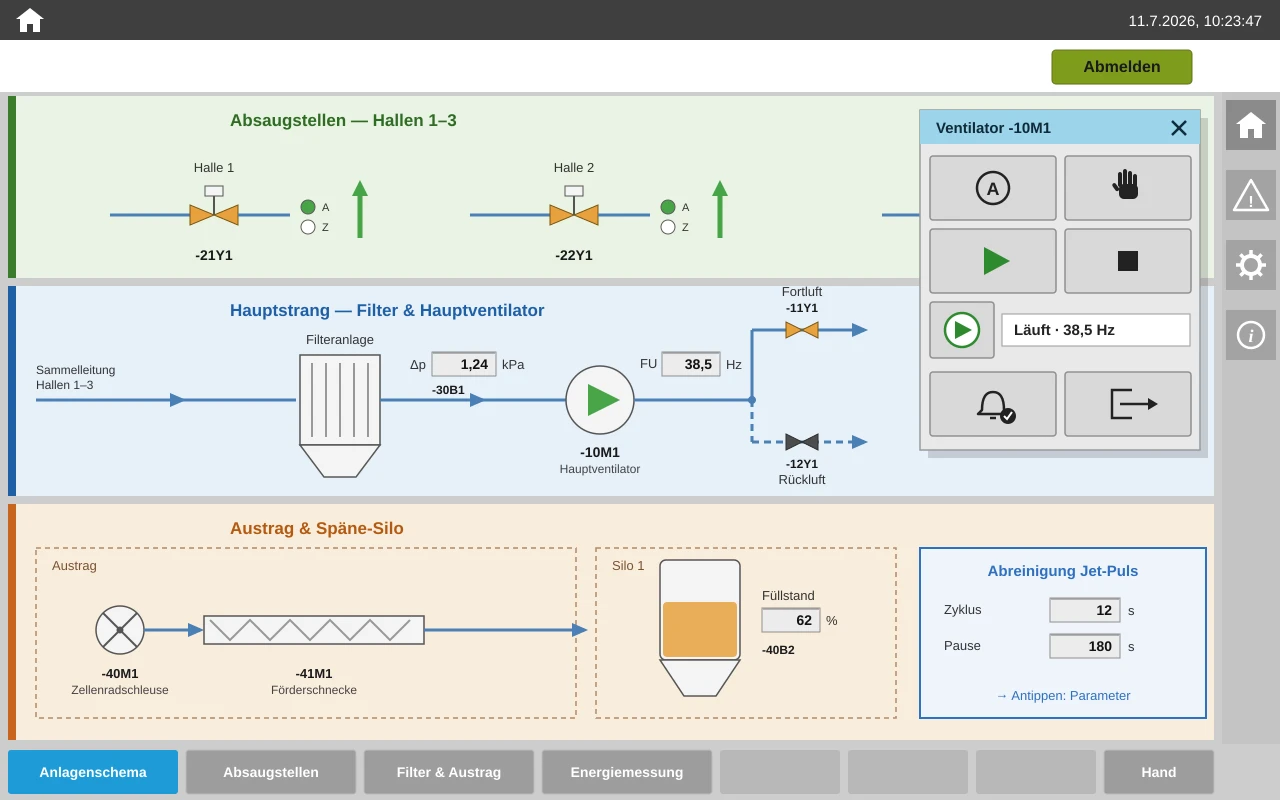
Plant schematic as a navigable flow diagram
The operator sees the plant as a flow diagram with states at a glance — not as a collection of number fields. A click on a unit opens its operating window.
Individual operating pop-ups per device type
A motor, valve, damper or controller is operated in context — operating mode, setpoints and faults in one place. Every device symbol is a scalable vector graphic (SVG) adapted to its device type and shows state and fault directly in the plant screen.
A consistent alarm concept
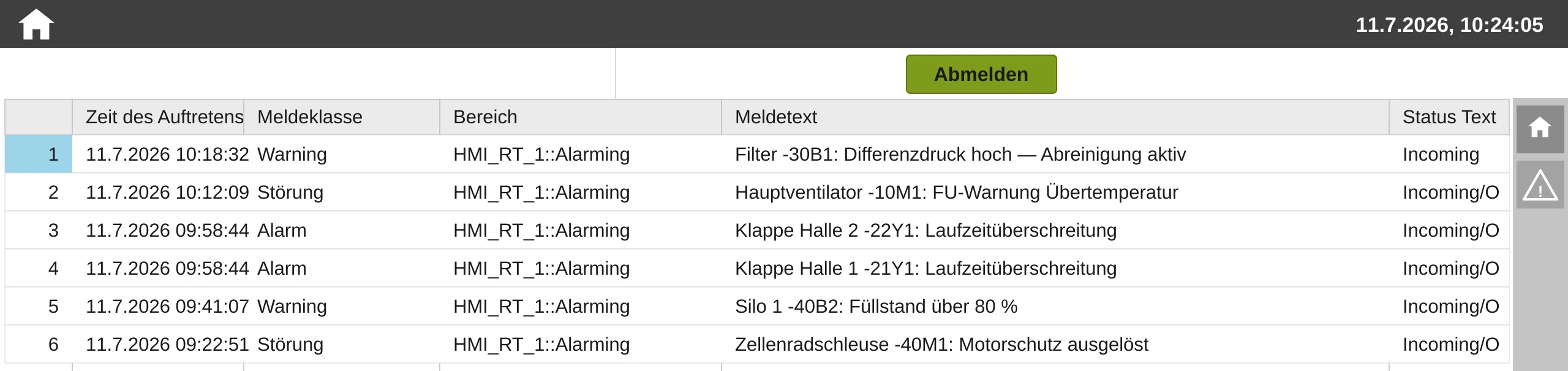
Messages with plain text, priority and acknowledgment logic instead of cryptic group faults — the foundation for fast fault-finding and clean analysis.
Web access included
WinCC Unified is browser-based: the plant status can be viewed from the control room, the office or a tablet in the hall — with no additional software.
A reusable standard instead of starting from scratch
Structure, operating logic and the symbol and pop-up library are available as a proven in-house standard — the plant schematic, units and texts are project-specific. This gives even a mid-sized existing plant a visualization at large-project level, at a cost that used to be budgeted for merely carrying over screens.
Related services
Control System Retrofit
Migrate S5, S7-300 or S7-400 to S7-1500/S7-1200 — often without rebuilding the control cabinet.
Control System Retrofit: Migrate S5, S7-300 or S7-400 to S7-1500/S7-1200 — often without rebuilding the control cabinet.Plant Data & OPC UA
Monitoring, reports and AI analysis via the standardized OPC UA interface — read-only and secure.
Plant Data & OPC UA: Monitoring, reports and AI analysis via the standardized OPC UA interface — read-only and secure.PLC Programming (TIA Portal)
Structured programs from a proven block library — tested before commissioning.
PLC Programming (TIA Portal): Structured programs from a proven block library — tested before commissioning.Frequently Asked Questions
A rebuild or a conversion of my old screens?
Converted screens carry over the screen layout, operating logic and alarm structure of the past — the result looks new and operates old. A rebuild to a screen concept, thanks to a reusable standard, costs no more than carrying over screens used to, and delivers operation at today's standard.
A Unified Panel or a Comfort successor?
Often the right Unified panel is even cheaper at the same display size — typically around 15 percent with the Unified Basic Panel. Add to that web access and Siemens' current product line. The decision is made based on plant size, operating concept and budget.
Is web access secure?
Access runs encrypted with role-based user management and stays within the plant or company network — you can define exactly who may see and operate what. A cloud is not required for this.
Modernize your visualization
From a discontinued panel to a Unified visualization with a screen concept — including migration of the plant logic and operator training.
✓ Non-binding initial consultation ✓ Response time < 24h on business days