

TP 177B, OP 177B, MP 277: Moving to Unified Comfort Panels
TP 177B, OP 177B and MP 277: some variants on P.M490 since 1 Oct 2026. Which Comfort or Unified panel fits the cutout, and how the project comes along.
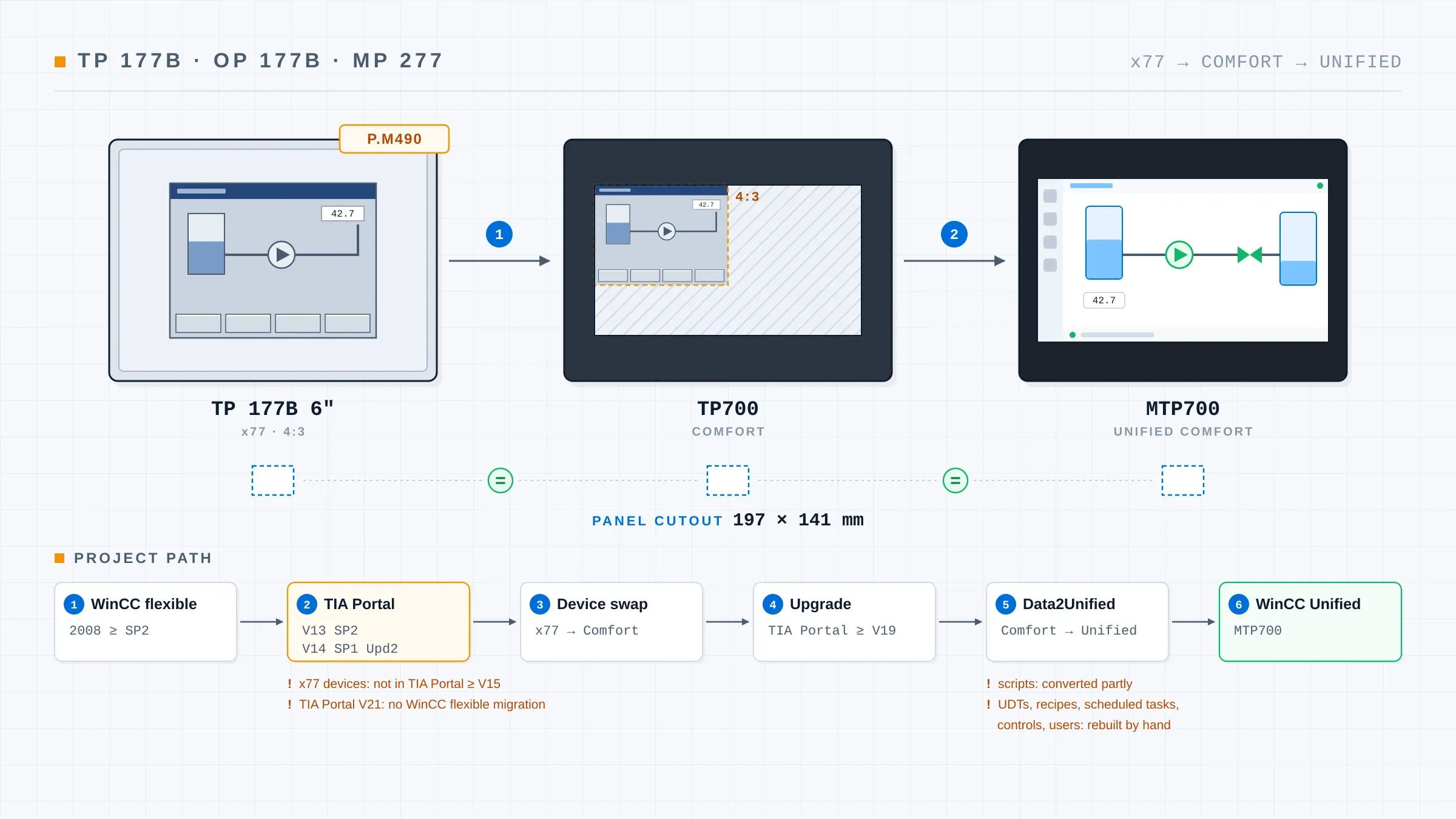
On 1 October 2026 the first variants of the TP 177B, OP 177B and MP 277 moved to P.M490. That is the status given in a Siemens lifecycle overview dated 15 July 2026, published as a PDF by a distributor. From that point there is no longer an obligation to supply spare parts for these devices. Further variants follow on 1 October 2027. If one of these operator panels sits on a running machine, the time to plan its successor is now, while the old unit still works and its project can still be secured.
The short answer first. A TP 177B 6" can be replaced in two steps, all the way to a Unified Comfort Panel, without touching the panel cutout. According to the Siemens migration guide for the Comfort Panels, the TP700 Comfort fits the same 197 × 141 mm cutout, and according to the Siemens guide to Unified Comfort (German), the MTP700 Unified Comfort fits the TP700 cutout in turn. The OP 177B and the MP 277 need a different cutout. The project follows in stages: from WinCC flexible through an older TIA Portal version and a Comfort Panel to WinCC Unified.
This article is for maintenance and operations managers who have one of these panels in the field. It works through the questions that keep coming up in the forums: which device fits which cutout, whether the project can be converted, why the TP 177B is missing from current TIA Portal versions, and whether the S7-300 behind it can stay.
What P.M490 means for the TP 177B, OP 177B and MP 277
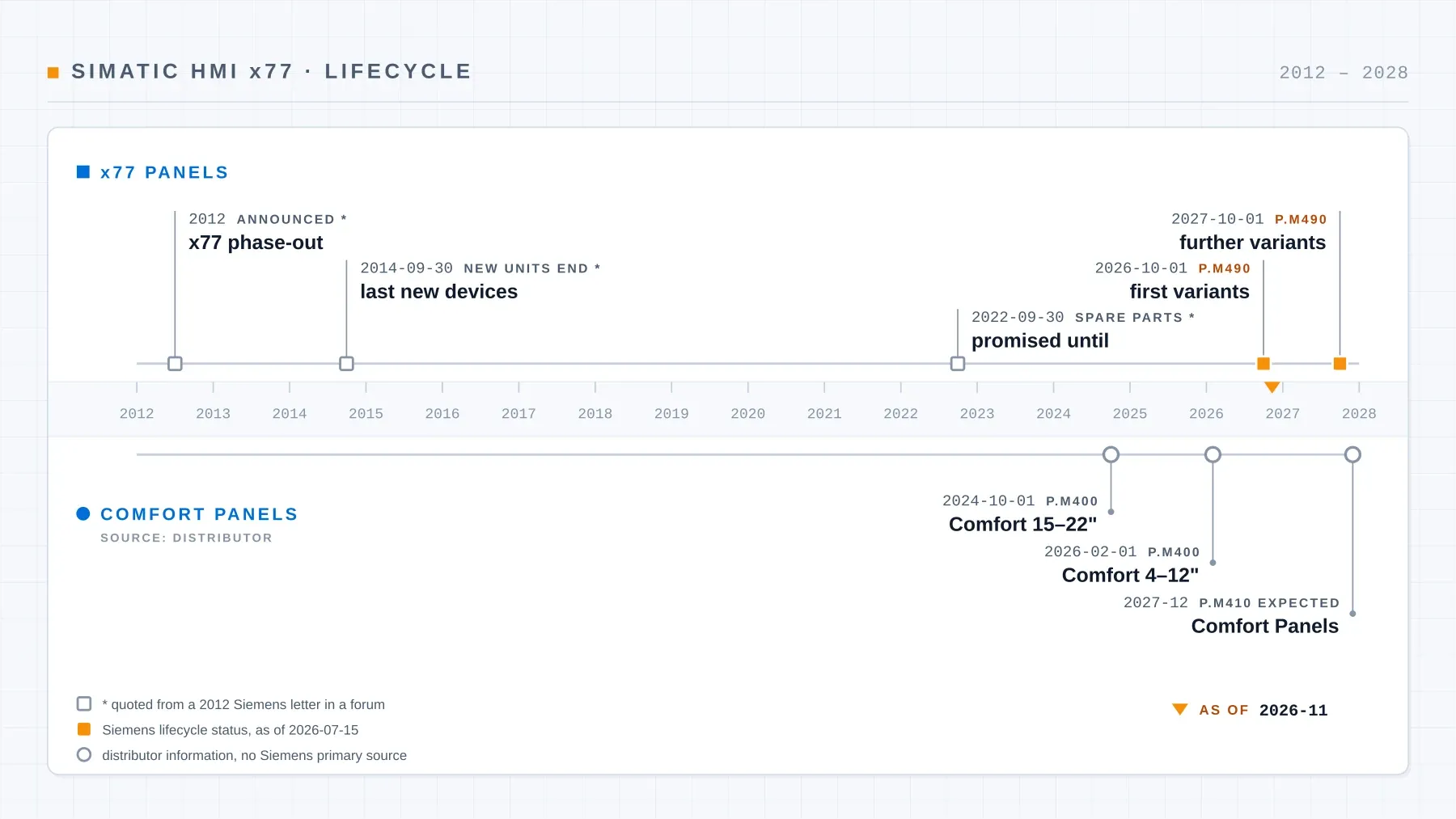
Besides the TP 177B, OP 177B and MP 277, the x77 family includes the MP 177, TP 277, OP 277 and MP 377. Their phase-out is not news. According to a Siemens customer letter quoted on the German SPS-Forum, Siemens announced it as early as 2012: new units until 30 September 2014, spare parts promised until 30 September 2022. I have not seen the original letter, so treat these dates with that caveat.
The Siemens status overview dated 15 July 2026 is the firmer source. It splits the family into two groups.
P.M490 since 1 October 2026:
- TP 177B 6" DP, Blue Mode (order number containing -0BC01)
- OP 177B 6" DP, Blue Mode (order number containing -0DC01)
- TP 277 and OP 277
- MP 277 8" Touch (order number containing -0CB01-1AX2)
- MP 377 12" Touch and Key, and MP 377 19" Touch
P.M490 postponed to 1 October 2027:
- TP 177B 6" PN/DP Color and TP 177B 4"
- OP 177B PN/DP Color
- MP 177
- MP 277 8" Touch (order number ending in -1AX1), MP 277 10" Touch and Key, MP 277 8" Key
- MP 377 15"
Until then, the second group is replaced subject to availability only, and Siemens may reject orders "without prior notice". For some devices Siemens offers a "Long Life Repair" (LLR) service. The order number on the rating plate tells you which variant you have. It also lets you look up the status in the Siemens data sheet; for 6AV6642-0BA01-1AX1, for example, it reads "spare part".
In operational terms: once a panel is on P.M490, a failed unit can no longer be reliably swapped for an identical one. While the plant is running, you choose the date of the changeover. Once the panel fails, the spare-parts situation chooses it for you.
The Comfort Panels are being phased out too
The direct successor is no longer new either. According to a Siemens distributor, the 4 to 12 inch Comfort Panels moved to P.M400 at the turn of January and February 2026, the 15 to 22 inch sizes as early as 1 October 2024. The distributor expects P.M410 "probably in December 2027". I have not found a Siemens primary source for these dates.
This leads to a distinction that matters later. In the project, the Comfort Panel is a required intermediate step. Whether it also goes into the cabinet as hardware is a separate decision.
Which panel fits which cutout?
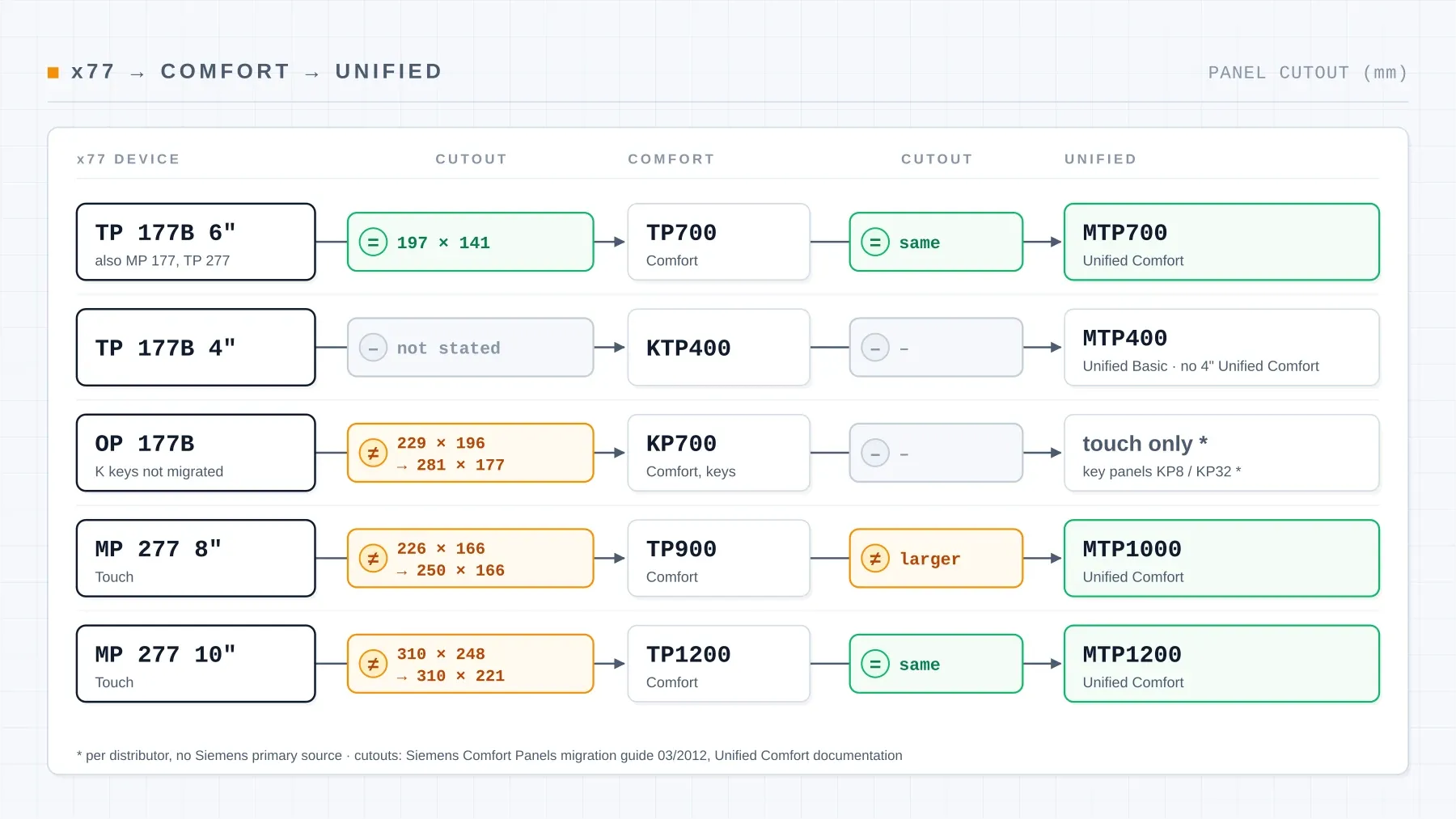
In its migration guide for the Comfort Panels, Siemens assigns a successor to each x77 device and lists the panel cutouts. For the second step, from Comfort to Unified Comfort, the figures are in the Unified Comfort guide and in the Unified Comfort Panels operating instructions (German).
| Existing device | Comfort successor | Cutout old → Comfort | Unified successor | Cutout Comfort → Unified |
|---|---|---|---|---|
| TP 177B 6" | TP700 | same, 197 × 141 mm | MTP700 | same |
| TP 177B 4" | KTP400 | not stated | MTP400 Unified Basic (no 4" Unified Comfort device) | – |
| OP 177B | KP700 | different: 229 × 196 mm → 281 × 177 mm | Unified panels have no keys (per distributor) | – |
| MP 277 8" Touch | TP900 | different: 226 × 166 mm → 250 × 166 mm | MTP1000 | larger cutout |
| MP 277 10" Touch | TP1200 | different: 310 × 248 mm → 310 × 221 mm | MTP1200 | same |
TP 177B 6": two swaps, one cutout
The TP 177B 6" is the easy case. The TP700 Comfort and the TP 177B share the 197 × 141 mm cutout, which the Comfort Panels hardware manual confirms alongside the migration guide. The MTP700 Unified Comfort then fits the TP700 cutout. The same mapping applies to the MP 177 and the TP 277, which Siemens also assigns to the TP700.
That settles the mechanical side. The open question is the one a user puts on the Siemens support forum: what if the original program is missing? That is covered two sections further down.
OP 177B: the cutout changes
For the OP 177B, Siemens names the KP700 as successor. The cutout does not match: 229 × 196 mm on the OP 177B against 281 × 177 mm on the KP700. The new opening is wider and lower than the old one, so the front plate or console door needs work. The documents I evaluated do not mention a Siemens adapter frame for this change. An OP 277 is the better starting point: it shares its cutout with the KP700.
On an OP there is a second issue, the keys. More on that under the pitfalls below.
MP 277: the 8 and 10 inch models differ
The MP 277 8" Touch becomes a TP900, whose 250 × 166 mm cutout is wider than the old 226 × 166 mm. There is no 9 inch device in the Unified range; the TP900 maps to the MTP1000, which needs a larger cutout again. Fitting a TP900 now and an MTP1000 later therefore means cutting the front plate twice.
The MP 277 10" Touch becomes a TP1200. The width stays at 310 mm, the height drops from 248 to 221 mm, and the MTP1200 then fits the TP1200 cutout. A user on the SPS-Forum asks about exactly this change, looking for an adapter frame because the existing cutout is too large. For the step from Comfort to Unified, Siemens names adapter frames for sizes of 15 inches and up; for the move from MP 277 10" to TP1200, the documents I evaluated name none. Siemens maps the key variants to the KP900 (MP 277 8" Key) and the KP1200 (MP 277 10" Key).
First step: does the project still exist?
Before any hardware decision comes the project file. With the WinCC flexible source project, there is a documented software route to WinCC Unified. Without it, the options are rebuilding the screens or a backup conversion through Siemens support.
A ProSave backup is not a project
If there is a ProSave backup of the running panel, it only goes so far. As explained on the Siemens support forum, the configuration cannot be recovered from it. The backup is an image for a device of the same type. It is still worth having: if the panel fails, it brings an identical replacement unit back into service. If you do not have one yet, take it now.
Back transfer only with a *.pdz file
A project can only be retrieved from the panel if the "Enable back transfer" option was active at download and the *.pdz file is on the memory card. That is how Siemens FAQ 21907703 describes it. So the first question to ask the device is whether such a file is on its card.
Where else the project may be
Whether anyone thought of back transfer at the last download is often unknown. Then the search begins: on the old programming device, at the machine or plant builder, in the commissioning documents. For the later route into TIA Portal, the project must be at least in WinCC flexible 2008 SP2, according to the Siemens migration guide.
The PC matters as well. According to its readme (German), WinCC flexible 2008 SP5 is released for Windows 7 and Windows 10. There is no release for Windows 11, as a reply on the Siemens forum also confirms. A working programming device with WinCC flexible is part of securing the project.
The software route in stages: from WinCC flexible to WinCC Unified
"Is there some kind of conversion, or do I have to reprogram entire projects?" That is how a user on the SPS-Forum puts it. The honest answer is somewhere in between. Siemens describes a route with several stops:
- WinCC flexible 2008, SP2 or later: the source project is the starting point.
- TIA Portal V13 SP2 or V14 SP1 Upd2: the project is migrated into one of these versions. From TIA Portal V15 onwards, the x77 panels can no longer be configured.
- Device replacement in the project: in V13 or V14, the x77 device is swapped for the matching Comfort Panel.
- Upgrade: the project then moves to a current TIA Portal version, V19 or later for the next step.
- Data2Unified: this add-in takes Basic, Comfort and Mobile panels into WinCC Unified, from TIA Portal V19 according to the Data2Unified manual.
Steps 2 and 3 are described in the Siemens migration guide. They also answer a question that comes up again and again: a user looks for the TP 177B in TIA Portal V15.1 and cannot find it. From V15 onwards the device is simply not there.
The stages happen in the project. If the target is a Unified device anyway, the Comfort Panel does not need to be installed in the cabinet at all. On an MP 277 8", that saves one of the two cuts in the front plate.
What has to be rebuilt after conversion
At the end of the stages, you have a Unified project to work from. Parts of it need rework, and that belongs in the plan from the start.
Scripts
VBScript becomes JavaScript in WinCC Unified. The Data2Unified manual says scripts are translated "partially". An older Siemens guide dated February 2025 still states that all scripts have to be recreated. Which statement applies depends on the add-in version you use. I therefore budget existing scripts as new work with their own test. What scripting in WinCC Unified looks like is covered in the article on React HMI development with WinCC Unified.
HMI data types, recipes, tasks, users
According to the Data2Unified manual, these have to be rebuilt by hand:
- HMI user data types (HMI UDTs)
- recipes
- scheduled tasks
- controls
Users and user groups are not carried over by Data2Unified either, according to the Siemens guide to migrating to WinCC Unified. The more recipes and password levels a panel has, the bigger this part of the job.
Can I replace the panel and keep the S7-300?
Often there is an S7-300 behind the old panel that is meant to stay for now. One user on the Siemens forum is looking for exactly that, a replacement for an MP 277 10"; another on the SPS-Forum needs one for an OP 177B Color on MPI with 10 to 12 keys.
According to the operating instructions (German), Unified Comfort Panels support the S7-300/400 and S7-1200/1500, but only over Industrial Ethernet, as the WinCC Unified documentation on communication channels states. If the S7-300 has an Industrial Ethernet connection, the panel can be replaced without replacing the CPU.
An S7-300/400 with only an MPI or PROFIBUS DP port can be reached from a Unified panel only via S7 routing, for example through an IE/PB Link. According to the update notes, WinCC Unified supports this from TIA Portal V20 Update 3. Whether that setup is worth it for a controller that is itself due for replacement is a separate question. How a control system retrofit runs is described in the article on the S7-300 retrofit to S7-1500 and WinCC Unified.
Pitfalls: 4:3 screens and missing keys
From 4:3 to 16:9
The x77 panels have 4:3 displays, their successors 16:9. In its migration guide, Siemens lists several options for converting the screens. A user on the SPS-Forum describes what the result of such a conversion can look like: afterwards the screens used only a quarter of the display, and the text was very small. Adapting the screens to the new format therefore belongs in the plan as a task of its own, checked on the target device.
The keys on the OPs
When moving from an OP to a Comfort Panel, the K keys are not carried over, according to the migration guide. For Unified, a distributor adds that the Unified panels have no keys, and names the KP8 and KP32 key panels as an add-on.
Where function keys are a fixed part of operation, for acknowledging alarms or selecting operating modes for example, the operating concept has to be redefined: as a touch button, as a pushbutton on the console, or via a key panel. The plant owner makes that decision together with the operators, before any programming starts.
Staged route or a rebuild in WinCC Unified?
From an engineering office's point of view, the staged route is mainly a way of carrying content over: tags, screen structure, alarm texts. The operating concept stays the old one, just on a display with a different format. Whether that is enough depends on the plant.
| Criterion | Staged route via Comfort | Rebuild in WinCC Unified |
|---|---|---|
| Source project | available, WinCC flexible 2008 SP2 or later | missing, or used only as a reference |
| Scripts, recipes, users | few | many, to be rebuilt anyway |
| Operating concept | should stay | should be revised, e.g. on an OP with keys |
| Screens | can be adapted to 16:9 | are redesigned for 16:9 |
| Controller | stays | is replaced as well |
| Panels on site | a single device | several that should be made consistent |
Once several points in the right-hand column apply, a rebuild is the cleaner route. The screens then follow a consistent screen concept, tags and alarms are derived from the PLC structure, and the whole HMI is tested against the PLC program in simulation before commissioning. The old project remains valuable as a reference for screen content, alarm texts and limit values. How I set up such projects is described on the HMI visualization with WinCC Unified page.
For a TP 177B 6" with a complete project, few scripts and an operating concept everyone is happy with, the staged route is the obvious choice. The cutout fits, and most of the project comes along.
Usually one question decides: should the new panel be operated like the old one, or is the replacement the moment to rework how the machine is operated?
Next step: order number, project, cutout
A TP 177B on P.M490 is not an emergency as long as it runs. The order of work for an existing installation:
- Read the order number off the rating plate and look up its status.
- Take a ProSave backup, check the memory card for a *.pdz file, and secure the WinCC flexible project together with a PC that still runs WinCC flexible.
- Compare the panel cutout with the mapping above, and check how the controller is connected: Industrial Ethernet or MPI/DP only.
- Only then choose between the staged route and a rebuild.
Sources
- Siemens: lifecycle status overview SIMATIC HMI x77, as of 15 July 2026 — PDF (hosted by a distributor); data sheet 6AV6642-0BA01-1AX1 — PDF
- Siemens: Comfort Panels migration guide, 03/2012 — PDF (copy at Distrelec); Comfort Panels hardware manual — PDF
- Siemens: guide to Unified Comfort (German) — PDF; Unified Comfort Panels operating instructions (German): panel cutout, communication with controllers
- Siemens: migration guide WinCC flexible → TIA Portal — PDF; migration options in TIA Portal V21; WinCC flexible 2008 SP5 — readme (PDF, German)
- Siemens: Data2Unified — manual (PDF); guide to migrating to WinCC Unified: user administration, scripts
- Siemens: WinCC Unified, supported PLCs and communication channels; improvements in TIA Portal V20 Update 3
- Siemens: FAQ 21907703 on back transfer — PDF (copy at E&M); system backup conversion — PDF
- Siemens support forum: WinCC flexible 2008 SP5 RT on Windows 11, recovering the configuration from ProSave backup files (German), TP177B to TP700 without the original program, MP277 10" replacement — forum posts, not product documentation
- SPS-Forum (German): announcement of the SIMATIC HMI phase-out (2012), replacing an old HMI, replacement for OP177B color, TP177B with TIA V15.1, adapting the panel cutout — forum posts
- Distributor: eichler-service on the Comfort Panels discontinuation — article
About the author: This article was written by David Prybisch, owner of Prybisch Automation in Luxembourg. He has been programming and commissioning control systems for more than twelve years and replaces old operator panels and controllers in existing plants with S7-1500 and WinCC Unified; an overview of all services is available here.